How it works
From Download to Discovery in Minutes.
A quick guide to getting started with MultiVerso and finding your way around the app.
-
Step 1
Download MultiVerso
Open the official store listing from our Download page — or scan the QR code with your phone camera — and tap Install.
-
Step 2
Open the app
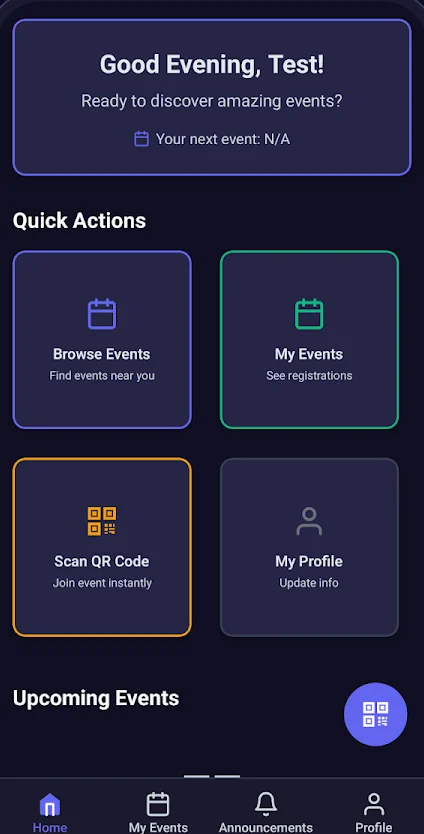
Launch MultiVerso and follow the prompts shown on screen. The home screen gathers quick actions in one place.
-
Step 3
Find your conference
Browse events to find your conference and open it to see what is available.
-
Step 4
Explore sessions and speakers
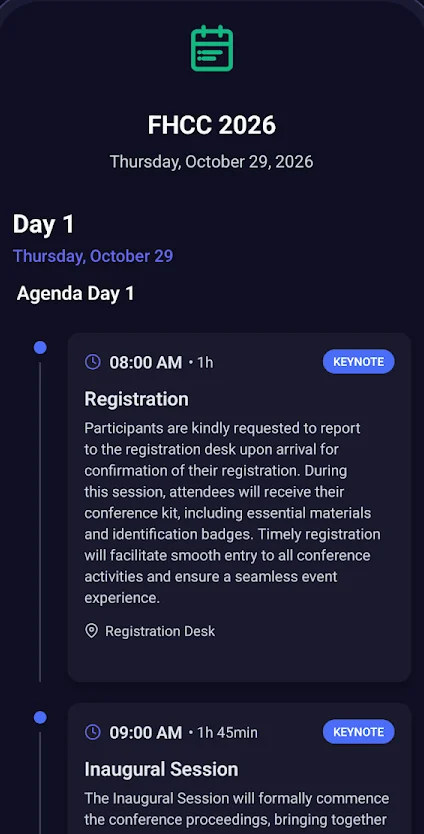
Follow the program day by day, with session times, durations and locations, and discover who is presenting.
-
Step 5
Follow announcements
Check announcements for news and important updates from the organizers.
Take your conference with you
Your Next Conference Experience Starts Here.
Get MultiVerso from the official store listing and keep the conference within reach.
- 1Tap the store button or scan the code
- 2Tap Install
- 3Open MultiVerso and explore